 56e24d8c7b
* docs: edit Langfuse integration page * update-docker-compose-and-docs-review --------- Co-authored-by: Mendon Kissling <59585235+mendonk@users.noreply.github.com>
5 KiB
| title | slug |
|---|---|
| Langfuse | /integrations-langfuse |
import Tabs from '@theme/Tabs'; import TabItem from '@theme/TabItem';
Integrate Langfuse with Langflow
Langfuse (GitHub) is an open-source platform for LLM observability. It provides tracing and monitoring capabilities for AI applications, helping developers debug, analyze, and optimize their AI systems. Langfuse integrates with various tools and frameworks such as workflows builders like Langflow.
This guide walks you through how to configure Langflow to collect tracing data about your flow executions and automatically send the data to Langfuse.
Prerequisites
- A project in Langflow with a runnable flow
- A Langfuse Cloud or self-hosted Langfuse account
Set Langfuse credentials as environment variables
-
In Langfuse, go to Project Settings, and then create a new set of API keys.
-
Copy the following API key information:
- Secret Key
- Public Key
- Host URL
- Set your Langfuse project credentials as environment variables in the same environment where you run Langflow.
The following examples set environment variables in a Linux or macOS terminal session or in a Windows command prompt session:
Replace SECRET_KEY, PUBLIC_KEY, and HOST_URL with the API key information you copied from Langfuse.
Start Langflow and view traces in Langfuse
- Start Langflow in the same terminal or environment where you set the environment variables:
uv run langflow run
-
In Langflow, open an existing project, and then run a flow.
Langflow automatically collects and sends tracing data about the flow execution to Langfuse.
-
View the collected data in your Langfuse project dashboard.
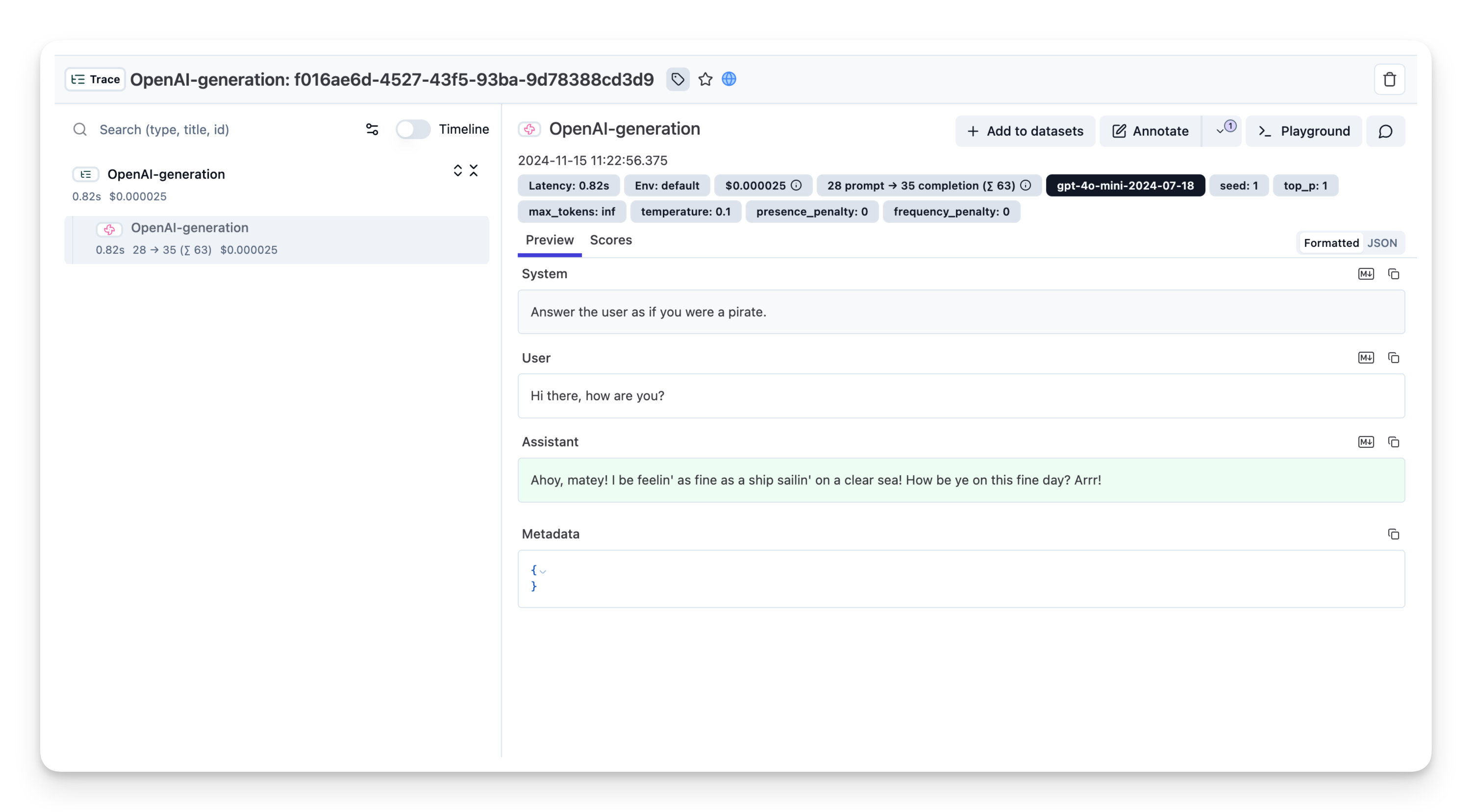
For a live public example trace in a Langfuse dashboard, see Public example trace in Langfuse.
Disable Langfuse Tracing
To disable the Langfuse integration, remove the environment variables you set in the previous steps and restart Langflow.
Run Langfuse and Langflow with Docker Compose
If you prefer to self-host Langfuse, you can run both services with Docker Compose.
-
In Langfuse, go to Project Settings, and then create a new set of API keys.
-
Copy the following API key information:
- Secret Key
- Public Key
- Host URL
- Add your Langflow API keys to your
docker-compose.ymlfile. An example docker-compose.yml file is available in the Langflow GitHub repo.
services:
  langflow:
    image: langflowai/langflow:latest # or another version tag on https://hub.docker.com/r/langflowai/langflow
    pull_policy: always               # set to 'always' when using 'latest' image
    ports:
      - "7860:7860"
    depends_on:
      - postgres
    environment:
      - LANGFLOW_DATABASE_URL=postgresql://langflow:langflow@postgres:5432/langflow
      # This variable defines where the logs, file storage, monitor data and secret keys are stored.
      - LANGFLOW_CONFIG_DIR=app/langflow
      - LANGFUSE_SECRET_KEY=sk-...
      - LANGFUSE_PUBLIC_KEY=pk-...
      - LANGFUSE_HOST=https://us.cloud.langfuse.com
    volumes:
      - langflow-data:/app/langflow

  postgres:
    image: postgres:16
    environment:
      POSTGRES_USER: langflow
      POSTGRES_PASSWORD: langflow
      POSTGRES_DB: langflow
    ports:
      - "5432:5432"
    volumes:
      - langflow-postgres:/var/lib/postgresql/data

volumes:
  langflow-postgres:
  langflow-data:
- Start the Docker container.
docker-compose up
- To confirm Langfuse is connected to your Langflow container, run this command.
Ensure you've exported
LANGFLOW_HOSTas a variable in your terminal.
docker compose exec langflow python -c "import requests, os; addr = os.environ.get('LANGFUSE_HOST'); print(addr); res = requests.get(addr, timeout=5); print(res.status_code)"
An output similar to this indicates success:
https://us.cloud.langfuse.com
200