
1327 lines
44 KiB
Markdown
1327 lines
44 KiB
Markdown
# vimspector - A multi language graphical debugger for Vim
|
|
|
|
For a tutorial and usage overview, take a look at the
|
|
[Vimspector website][website]
|
|
|
|
[](https://dev.azure.com/puremouron/Vimspector/_build/latest?definitionId=1&branchName=master) [](https://gitter.im/vimspector/Lobby?utm_source=badge&utm_medium=badge&utm_campaign=pr-badge)
|
|
|
|
<!--ts-->
|
|
* [Features and Usage](#features-and-usage)
|
|
* [Supported debugging features](#supported-debugging-features)
|
|
* [Supported languages:](#supported-languages)
|
|
* [Languages known to work](#languages-known-to-work)
|
|
* [Languages known not to work](#languages-known-not-to-work)
|
|
* [Other languages](#other-languages)
|
|
* [Installation](#installation)
|
|
* [Dependencies](#dependencies)
|
|
* [Neovim differences](#neovim-differences)
|
|
* [Windows differences](#windows-differences)
|
|
* [Language dependencies](#language-dependencies)
|
|
* [Clone the plugin](#clone-the-plugin)
|
|
* [Install some gadgets](#install-some-gadgets)
|
|
* [Manual gadget installation](#manual-gadget-installation)
|
|
* [The gadget directory](#the-gadget-directory)
|
|
* [Trying it out](#trying-it-out)
|
|
* [About](#about)
|
|
* [Background](#background)
|
|
* [Status](#status)
|
|
* [Experimental](#experimental)
|
|
* [Mappings](#mappings)
|
|
* [Visual Studio / VSCode](#visual-studio--vscode)
|
|
* [Human Mode](#human-mode)
|
|
* [Usage](#usage)
|
|
* [Launch and attach by PID:](#launch-and-attach-by-pid)
|
|
* [Launch with options](#launch-with-options)
|
|
* [Breakpoints](#breakpoints)
|
|
* [Stepping](#stepping)
|
|
* [Variables and scopes](#variables-and-scopes)
|
|
* [Watches](#watches)
|
|
* [Stack Traces](#stack-traces)
|
|
* [Program Output](#program-output)
|
|
* [Console](#console)
|
|
* [Closing debugger](#closing-debugger)
|
|
* [Debug adapter configuration](#debug-adapter-configuration)
|
|
* [C, C , Rust, etc.](#c-c-rust-etc)
|
|
* [Remote debugging](#remote-debugging)
|
|
* [Remote launch and attach](#remote-launch-and-attach)
|
|
* [Python](#python)
|
|
* [Remote Debugging](#remote-debugging-1)
|
|
* [Remote launch and attach](#remote-launch-and-attach-1)
|
|
* [Legacy: vscode-python](#legacy-vscode-python)
|
|
* [TCL](#tcl)
|
|
* [C♯](#c)
|
|
* [Go](#go)
|
|
* [PHP](#php)
|
|
* [Debug web application](#debug-web-application)
|
|
* [Debug cli application](#debug-cli-application)
|
|
* [JavaScript, TypeScript, etc.](#javascript-typescript-etc)
|
|
* [Java](#java)
|
|
* [Usage with YouCompleteMe](#usage-with-youcompleteme)
|
|
* [Other LSP clients](#other-lsp-clients)
|
|
* [Rust](#rust)
|
|
* [Other servers](#other-servers)
|
|
* [Customisation](#customisation)
|
|
* [Changing the default signs](#changing-the-default-signs)
|
|
* [FAQ](#faq)
|
|
* [Motivation](#motivation)
|
|
* [License](#license)
|
|
|
|
<!-- Added by: ben, at: Mon 6 Jul 2020 11:30:01 BST -->
|
|
|
|
<!--te-->
|
|
|
|
# Features and Usage
|
|
|
|
The plugin is a capable Vim graphical debugger for multiple languages.
|
|
It's mostly tested for c++, python and TCL, but in theory supports any
|
|
language that Visual Studio Code supports (but see caveats).
|
|
|
|
The [Vimspector website][website] has an overview of the UI, along with basic
|
|
instructions for configuration and setup.
|
|
|
|
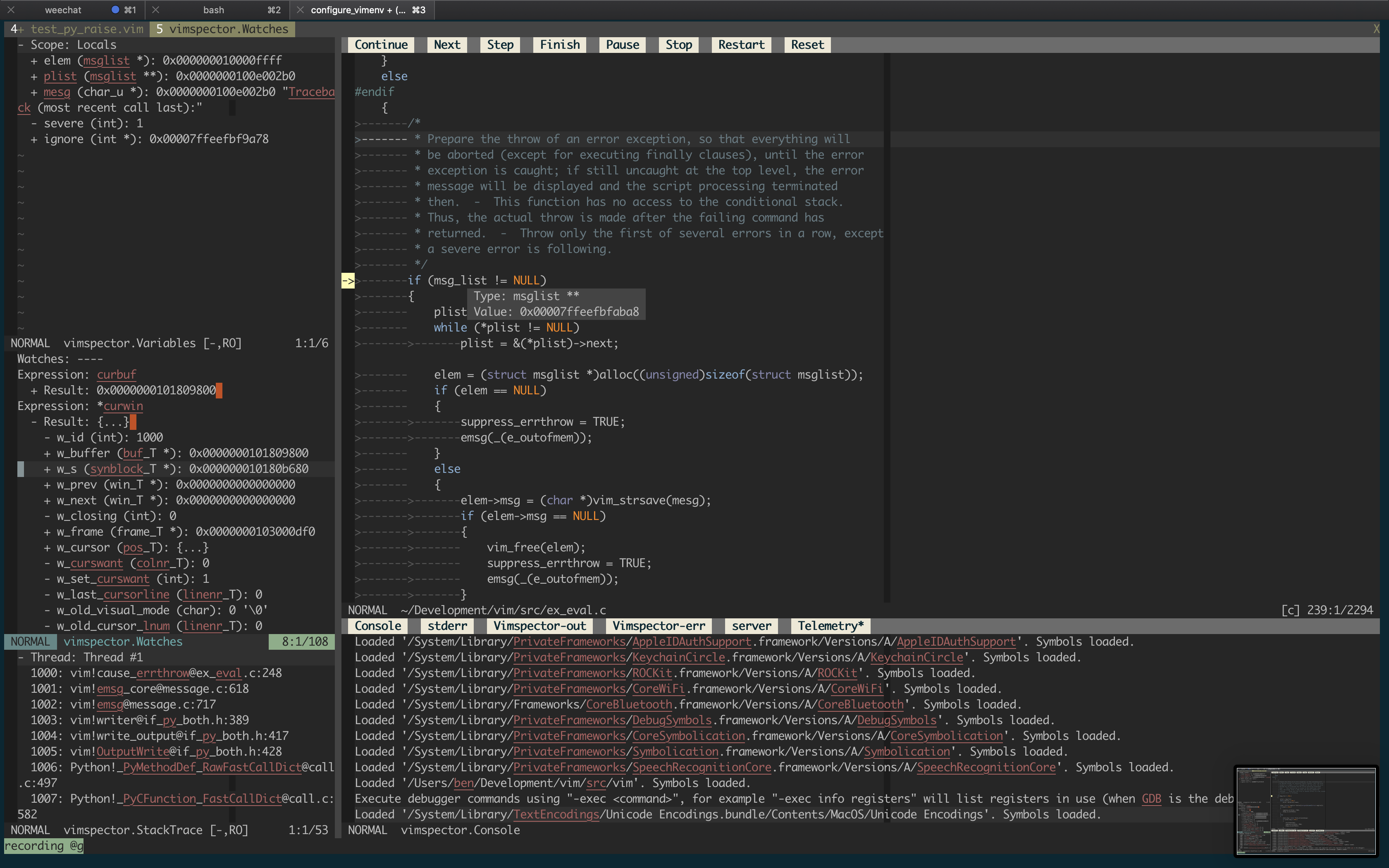
But for now, here's a (rather old) screenshot of Vimsepctor debugging Vim:
|
|
|
|
|
|
|
|
## Supported debugging features
|
|
|
|
- flexible configuration syntax that can be checked in to source control
|
|
- breakpoints (function, line and exception breakpoints)
|
|
- conditional breakpoints (function, line)
|
|
- step in/out/over/up, stop, restart
|
|
- launch and attach
|
|
- remote launch, remote attach
|
|
- locals and globals display
|
|
- watch expressions
|
|
- call stack display and navigation
|
|
- variable value display hover
|
|
- interactive debug console
|
|
- launch debugee within Vim's embedded terminal
|
|
- logging/stdout display
|
|
- simple stable API for custom tooling (e.g. integrate with language server)
|
|
|
|
## Supported languages:
|
|
|
|
The following languages are used frequently by the author and are known to work
|
|
with little effort, and are supported as first-class languages.
|
|
|
|
- C, C++, etc. (languages supported by gdb or lldb)
|
|
- Python 2 and Python 3
|
|
- TCL
|
|
- Bash scripts
|
|
- Java
|
|
|
|
## Languages known to work
|
|
|
|
The following languages are used frequently by the author, but require some sort
|
|
of hackery that makes it challenging to support generally. These languages are
|
|
on a best-efforts basis:
|
|
|
|
- C# (c-sharp) using dotnet core
|
|
- Go (requires separate installation of [Delve][])
|
|
- Node.js (requires node <12 for installation)
|
|
- Anything running in chrome (i.e. javascript).
|
|
|
|
## Languages known not to work
|
|
|
|
- C# (c-sharp) using mono debug adapter (vimspector unable to set breakpoints)
|
|
|
|
## Other languages
|
|
|
|
Vimspector should work for any debug adapter that works in Visual Studio Code,
|
|
but there are certain limitations (see FAQ). If you're trying to get vimspector
|
|
to work with a language that's not "supported", head over to Gitter and contact
|
|
the author. It should be possible to get it going.
|
|
|
|
# Installation
|
|
|
|
There are 2 installation methods:
|
|
|
|
* Using a release tarball, or
|
|
* Manually
|
|
|
|
Release tarballs come with debug adapters for the default languages
|
|
pre-packaged. To use a release tarball:
|
|
|
|
1. Check the dependencies
|
|
2. Untar the release tarball for your OS into `$HOME/.vim/pack`:
|
|
|
|
```
|
|
$ mkdir -p $HOME/.vim/pack
|
|
$ curl -L <url> | tar -C $HOME/.vim/pack zxvf -
|
|
```
|
|
|
|
3. Configure your project's debug profiles (create `.vimspector.json`)
|
|
|
|
Alternatively, you can clone the repo and select which gadgets are installed:
|
|
|
|
1. Check the dependencies
|
|
1. Install the plugin as a Vim package. See `:help packages`.
|
|
2. Install some 'gadgets' (debug adapters)
|
|
3. Configure your project's debug profiles (create `.vimspector.json`)
|
|
|
|
## Dependencies
|
|
|
|
Vimspector requires:
|
|
|
|
* One of:
|
|
* Vim 8.2 Huge build compiled with Python 3.6 or later
|
|
* Neovim 0.4.3 with Python 3.6 or later (experimental)
|
|
* One of the following operating systems:
|
|
* Linux
|
|
* macOS Mojave or later
|
|
* Windows (experimental)
|
|
|
|
Why such a new vim ? Well 2 reasons:
|
|
|
|
1. Because vimspector uses a lot of new Vim features
|
|
2. Because there are Vim bugs that vimspector triggers that will frustrate you
|
|
if you hit them.
|
|
|
|
Why is neovim experimental? Because the author doesn't use neovim regularly, and
|
|
there are no regression tests for vimspector in neovim, so it's likely to break
|
|
frequently. Issue reports are handled on best-efforts basis, and PRs are
|
|
welcome to fix bugs. See also the next section descibing differences for neovim
|
|
vs vim.
|
|
|
|
Why Windows support experimental? Because it's effort and it's not a priority
|
|
for the author. PRs are welcome to fix bugs. Windows will not be regularly
|
|
tested.
|
|
|
|
Which Linux versions? I only test on Ubuntu 18.04 and later and RHEL 7.
|
|
|
|
## Neovim differences
|
|
|
|
neovim doesn't implement some features Vimspector relies on:
|
|
|
|
* WinBar - used for the buttons at the top of the code window and for changing
|
|
the output window's current output.
|
|
* Prompt Buffers - used to send commands in the Console and add Watches
|
|
* Balloons - used to display the values of variables when debugging.
|
|
|
|
Workarounds are in place as follows:
|
|
|
|
* WinBar - There are [mappings](#mappings),
|
|
[`:VimspectorShowOutput`](#program-output) and
|
|
[`:VimspectorReset`](#closing-debugger)
|
|
* Prompt Buffers - There are [`:VimspectorEval`](#console)
|
|
and [`:VimspectorWatch`](#watches)
|
|
|
|
There is no workaroud for the lack of balloons; you'll just have to use
|
|
`:VimspectorEval` or `:VimspectorWatch`, or switch to Vim.
|
|
|
|
## Windows differences
|
|
|
|
The following features are not implemented for Windows:
|
|
|
|
* Tailing the vimspector log in the Output Window.
|
|
|
|
## Language dependencies
|
|
|
|
The debug adapters themselves have certain runtime dependencies. They are
|
|
categorised as follows:
|
|
|
|
* `Tested` : Fully supported, Vimspector regression tests cover them
|
|
* `Supported` : Fully supported, frequently used and manually tested
|
|
* `Experimental`: Working, but not frequently used and rarely tested
|
|
* `Legacy`: No longer supported, please migrate your config
|
|
|
|
| Language | Status | Switch | Adapter | Dependencies |
|
|
|------------------|--------------|--------------------------------|---------------------|--------------------------------------------|
|
|
| C, C++, etc. | Tested | `--all` or `--enable-c` | vscode-cpptools | mono-core |
|
|
| Python | Tested | `--all` or `--enable-python` | debugpy | Python 2.7 or Python 3 |
|
|
| Go | Tested | `--enable-go` | vscode-go | Go, [Delve][] |
|
|
| TCL | Supported | `--all` or `--enable-tcl` | tclpro | TCL 8.5 |
|
|
| Bourne Shell | Supported | `--all` or `--enable-bash` | vscode-bash-debug | Bash v?? |
|
|
| Node.js | Supported | `--force-enable-node` | vscode-node-debug2 | 6 < Node < 12, Npm |
|
|
| Javascript | Supported | `--force-enable-chrome` | debugger-for-chrome | Chrome |
|
|
| Java | Supported | `--force-enable-java ` | vscode-java-debug | Compatible LSP plugin (see [later](#java)) |
|
|
| C# (dotnet core) | Experimental | `--force-enable-csharp` | netcoredbg | DotNet core |
|
|
| C# (mono) | Experimental | `--force-enable-csharp` | vscode-mono-debug | Mono |
|
|
| Rust (CodeLLDB) | Experimental | `--force-enable-rust` | CodeLLDB | Python 3 |
|
|
| Python.legacy | Legacy | `--force-enable-python.legacy` | vscode-python | Node 10, Python 2.7 or Python 3 |
|
|
|
|
For other languages, you'll need some other way to install the gadget.
|
|
|
|
## Clone the plugin
|
|
|
|
There are many Vim plugin managers, and I'm not going to state a particular
|
|
preference, so if you choose to use one, you're on your own with installation
|
|
issues.
|
|
|
|
Install vimspector as a Vim package, either by cloning this repository into your
|
|
package path, like this:
|
|
|
|
```
|
|
$ git clone https://github.com/puremourning/vimspector ~/.vim/pack/vimspector/opt/vimspector
|
|
```
|
|
|
|
2. Configure vimspector in your `.vimrc`:
|
|
|
|
```viml
|
|
let g:vimspector_enable_mappings = 'HUMAN'
|
|
```
|
|
|
|
3. Load vimspector at runtime. This can also be added to your `.vimrc` after
|
|
configuring vimspector:
|
|
|
|
```
|
|
packadd! vimspector
|
|
```
|
|
|
|
See support/doc/example_vimrc.vim.
|
|
|
|
## Install some gadgets
|
|
|
|
There are a couple of ways of doing this, but ***using `install_gadget.py` is
|
|
highly recommended*** where that's an option.
|
|
|
|
For supported languages, `install_gadget.py` will:
|
|
|
|
* Download the relevant debug adapter at a version that's been tested from the
|
|
internet, either as a 'vsix' (Visusal Studio plugin), or clone from GitHub. If
|
|
you're in a corporate environment and this is a problem, you may need to
|
|
install the gadgets manually.
|
|
* Perform any necessary post-installation actions, such as:
|
|
* Building any binary components
|
|
* Ensuring scripts are executable, because the VSIX pacakges are usually
|
|
broken in this regard.
|
|
* Set up the `gadgetDir` symlinks for the platform.
|
|
|
|
To install the tested debug adapter for a language, run:
|
|
|
|
```
|
|
./install_gadget.py --enable-<language>
|
|
```
|
|
|
|
Or to install all supported gagtets:
|
|
|
|
```
|
|
./install_gadget.py --all
|
|
```
|
|
|
|
To install everything other than TCL (because TCL is sadly not as popular as it
|
|
should be):
|
|
|
|
```
|
|
./install_gadget.py --all --disable-tcl
|
|
```
|
|
|
|
See `--help` for more info.
|
|
|
|
## Manual gadget installation
|
|
|
|
You essentially need to get a working installation of the debug adapter, find
|
|
out how to start it, and configure that in an `adapters` entry in either your
|
|
`.vimspector.json` or in `.gadgets.json`.
|
|
|
|
The simplest way in practice is to install or start Visusal Studio Code and use
|
|
its extension manager to install the relevant extension. You can then configure
|
|
the adapter manually in the `adapters` section of your `.vimspector.json` or in
|
|
a `gadgets.json`.
|
|
|
|
PRs are always welcome to add configuration to do this to `install_gadget.py`.
|
|
|
|
### The gadget directory
|
|
|
|
Vimspector uses the following directory by default to look for a file named
|
|
`.gadgets.json`: `</path/to/vimspector>/gadgets/<os>`.
|
|
|
|
This path is exposed as the vimspector _variable_ `${gadgetDir}`. This is useful
|
|
for configuring gadget command lines.
|
|
|
|
Where os is one of:
|
|
|
|
* `macos`
|
|
* `linux`
|
|
* `windows` (though note: Windows is not supported)
|
|
|
|
The format is the same as `.vimspector.json`, but only the `adapters` key is
|
|
used:
|
|
|
|
Example:
|
|
|
|
```json
|
|
{
|
|
"adapters": {
|
|
"lldb-vscode": {
|
|
"variables": {
|
|
"LLVM": {
|
|
"shell": "brew --prefix llvm"
|
|
}
|
|
},
|
|
"attach": {
|
|
"pidProperty": "pid",
|
|
"pidSelect": "ask"
|
|
},
|
|
"command": [
|
|
"${LLVM}/bin/lldb-vscode"
|
|
],
|
|
"env": {
|
|
"LLDB_LAUNCH_FLAG_LAUNCH_IN_TTY": "YES"
|
|
},
|
|
"name": "lldb"
|
|
},
|
|
"vscode-cpptools": {
|
|
"attach": {
|
|
"pidProperty": "processId",
|
|
"pidSelect": "ask"
|
|
},
|
|
"command": [
|
|
"${gadgetDir}/vscode-cpptools/debugAdapters/OpenDebugAD7"
|
|
],
|
|
"name": "cppdbg"
|
|
},
|
|
"vscode-python": {
|
|
"command": [
|
|
"node",
|
|
"${gadgetDir}/vscode-python/out/client/debugger/debugAdapter/main.js"
|
|
],
|
|
"name": "vscode-python"
|
|
}
|
|
}
|
|
}
|
|
```
|
|
|
|
The gadget file is automatically written by `install_gadget.py`.
|
|
|
|
Vimspector will also load any fies matching:
|
|
`</path/to/vimspector>/gadgets/<os>/.gadgets.d/*.json`. These have the same
|
|
format as `.gadgets.json` but are not overwritten when running
|
|
`install_gadget.py`.
|
|
|
|
## Trying it out
|
|
|
|
If you just want to try out vimspector without changing your vim config, there
|
|
are example projects for a number of languages in `support/test`, including:
|
|
|
|
* Python (`support/test/python/simple_python`)
|
|
* Go (`support/test/go/hello_world`)
|
|
* Nodejs (`support/test/node/simple`)
|
|
* Chrome (`support/test/chrome/`)
|
|
* etc.
|
|
|
|
To test one of these out, cd to the directory and run:
|
|
|
|
```
|
|
vim -Nu /path/to/vimspector/tests/vimrc --cmd "let g:vimspector_enable_mappings='HUMAN'"
|
|
```
|
|
|
|
Then press `<F5>`.
|
|
|
|
There's also a C++ project in `tests/testdata/cpp/simple/` with a `Makefile`
|
|
which can be used to check everything is working. This is used by the regression
|
|
tests in CI so should always work, and is a good way to check if the problem is
|
|
your configuration rather than a bug.
|
|
|
|
# About
|
|
|
|
## Background
|
|
|
|
The motivation is that debugging in Vim is a pretty horrible experience,
|
|
particularly if you use multiple languages. With pyclewn no more and the
|
|
built-in termdebug plugin limited to gdb, I wanted to explore options.
|
|
|
|
While Language Server Protocol is well known, the Debug Adapter Protocol is less
|
|
well known, but achieves a similar goal: language agnostic API abstracting
|
|
debuggers from clients.
|
|
|
|
The aim of this project is to provide a simple but effective debugging
|
|
experience in Vim for multiple languages, by leveraging the debug adapters that
|
|
are being built for Visual Studio Code.
|
|
|
|
The ability to do remote debugging is a must. This is key to my workflow, so
|
|
baking it in to the debugging experience is a top bill goal for the project. So
|
|
vimspector has first-class support for executing programs remotely and attaching
|
|
to them. This support is unique to vimspector and on top of (complementary to)
|
|
any such support in actual debug adapters.
|
|
|
|
## Status
|
|
|
|
Vimspector is a work in progress, and any feedback/contributions are more
|
|
than welcome.
|
|
|
|
The backlog can be [viewed on Trello](https://trello.com/b/yvAKK0rD/vimspector).
|
|
|
|
### Experimental
|
|
|
|
The plugin is currently _experimental_. That means that any part of it
|
|
can (and probably will) change, including things like:
|
|
|
|
- breaking changes to the configuration
|
|
- keys, layout, functionatlity of the UI
|
|
|
|
However, I commit to only doing this in the most extreme cases and to annouce
|
|
such changes on Gitter well in advance. There's nothing more annoying than stuff
|
|
just breaking on you. I get that.
|
|
|
|
# Mappings
|
|
|
|
By default, vimspector does not change any of your mappings. Mappings are very
|
|
personal and so you should work out what you like and use vim's powerful mapping
|
|
features to set your own mappings. To that end, Vimspector defines the following
|
|
`<Plug>` mappings:
|
|
|
|
* `<Plug>VimspectorContinue`
|
|
* `<Plug>VimspectorStop`
|
|
* `<Plug>VimspectorRestart`
|
|
* `<Plug>VimspectorPause`
|
|
* `<Plug>VimspectorToggleBreakpoint`
|
|
* `<Plug>VimspectorToggleConditionalBreakpoint`
|
|
* `<Plug>VimspectorAddFunctionBreakpoint`
|
|
* `<Plug>VimspectorStepOver`
|
|
* `<Plug>VimspectorStepInto`
|
|
* `<Plug>VimspectorStepOut`
|
|
|
|
These map roughly 1-1 with the API functions below.
|
|
|
|
For example, if you want `<F5>` to start/continue debugging, add this to some
|
|
appropriate place, such as your `vimrc` (hint: run `:e $MYVIMRC`).
|
|
|
|
```viml
|
|
nmap <F5> <Plug>VimspectorContinue
|
|
```
|
|
|
|
That said, many people are familiar with particular debuggers, so the following
|
|
mappings can be enabled by setting `g:vimspector_enable_mappings` to the
|
|
specified value.
|
|
|
|
Please note: Currently there are no `<plug>` mappings. These will be added in
|
|
future to make custom mappings much easier.
|
|
|
|
## Visual Studio / VSCode
|
|
|
|
To use Visual Studio-like mappings, add the following to your `vimrc` **before
|
|
loading vimspector**:
|
|
|
|
```viml
|
|
let g:vimspector_enable_mappings = 'VISUAL_STUDIO'
|
|
```
|
|
|
|
| Key | Function | API |
|
|
| --- | --- | --- |
|
|
| `F5` | When debugging, continue. Otherwise start debugging. | `vimspector#Continue()` |
|
|
| `Shift F5` | Stop debugging. | `vimspector#Stop()` |
|
|
| `Ctrl Shift F5` | Restart debugging with the same configuration. | `vimspector#Restart()` |
|
|
| `F6` | Pause debugee. | `vimspector#Pause()` |
|
|
| `F9` | Toggle line breakpoint on the current line. | `vimspector#ToggleBreakpoint()` |
|
|
| `Shift F9` | Add a function breakpoint for the expression under cursor | `vimspector#AddFunctionBreakpoint( '<cexpr>' )` |
|
|
| `F10` | Step Over | `vimspector#StepOver()` |
|
|
| `F11` | Step Into | `vimspector#StepInto()` |
|
|
| `Shift F11` | Step out of current function scope | `vimspector#StepOut()` |
|
|
|
|
## Human Mode
|
|
|
|
If, like me, you only have 2 hands and 10 fingers, you probably don't like
|
|
Ctrl-Shift-F keys. Also, if you're running in a terminal, there's a real
|
|
possibility of terminfo being wrong for shifted-F-keys, particularly if your
|
|
`TERM` is `screen-256color`. If these issues (number of hands, `TERM` variables)
|
|
are unfixable, try the following mappings, by adding the following **before
|
|
loading vimspector**:
|
|
|
|
```viml
|
|
let g:vimspector_enable_mappings = 'HUMAN'
|
|
```
|
|
|
|
| Key | Function | API |
|
|
| --- | --- | --- |
|
|
| `F5` | When debugging, continue. Otherwise start debugging. | `vimspector#Continue()` |
|
|
| `F3` | Stop debugging. | `vimspector#Stop()` |
|
|
| `F4` | Restart debugging with the same configuration. | `vimspector#Restart()` |
|
|
| `F6` | Pause debugee. | `vimspector#Pause()` |
|
|
| `F9` | Toggle line breakpoint on the current line. | `vimspector#ToggleBreakpoint()` |
|
|
| `<leader>F9` | Toggle conditional line breakpoint on the current line. | `vimspector#ToggleBreakpoint( { trigger expr, hit count expr } )` |
|
|
| `F8` | Add a function breakpoint for the expression under cursor | `vimspector#AddFunctionBreakpoint( '<cexpr>' )` |
|
|
| `F10` | Step Over | `vimspector#StepOver()` |
|
|
| `F11` | Step Into | `vimspector#StepInto()` |
|
|
| `F12` | Step out of current function scope | `vimspector#StepOut()` |
|
|
|
|
# Usage
|
|
|
|
## Launch and attach by PID:
|
|
|
|
* Create `.vimspector.json`. See [below](#supported-languages).
|
|
* `:call vimspector#Launch()` and select a configuration.
|
|
|
|

|
|
|
|
### Launch with options
|
|
|
|
To launch a specific debug configuration, or specify [replacement
|
|
variables][vimspector-ref-var] for the launch, you can use:
|
|
|
|
* `:call vimspector#LaunchWithSettings( dict )`
|
|
|
|
The argument is a `dict` with the following keys:
|
|
|
|
* `configuration`: (optional) Name of the debug configuration to launch
|
|
* `<anything else>`: (optional) Name of a variable to set
|
|
|
|
This allows for some intergration and automation. For example, if you have a
|
|
configuration named `Run Test` that contains a [replacement
|
|
variable][vimspector-ref-var] named `${Test}` you could write a mapping which
|
|
ultimately executes:
|
|
|
|
```viml
|
|
vimspector#LaunchWithSettings( #{ configuration: 'Run Test'
|
|
\ Test: 'Name of the test' } )
|
|
```
|
|
|
|
This would start the `Run Test` configuration with `${Test}` set to `'Name of
|
|
the test'` and Vimspector would _not_ prompt the user to enter or confirm these
|
|
things.
|
|
|
|
See [this issue](https://github.com/puremourning/vimspector/issues/97) for
|
|
another example where it can be used to specify the port to connect the [java
|
|
debugger](#java---partially-supported)
|
|
|
|
## Breakpoints
|
|
|
|
* Use `vimspector#ToggleBreakpoint([ { 'condition': '<condition expr>' } ])`
|
|
to set/disable/delete a line breakpoint, with optional condition.
|
|
* Use `vimspector#AddFunctionBreakpoint( '<name>' [, { 'condition': '<condition expr>' } ] )`
|
|
to add a function breakpoint with optional condition.
|
|
|
|
Both of these functions take a single optional argument which is a dictionary of
|
|
options. The dictionary can have the following keys:
|
|
|
|
* `condition`: An optional expression evaluated to deterimie if the breakpoint
|
|
should fire. Not supported by all debug adapters. For example, to break when
|
|
`abc` is `10`, enter something like `abc == 10`, depending on the language.
|
|
* `hitCondition`: An optional expression evaluated to determine a number of
|
|
times the breakpoint should be ignored. Should (probablty?) not be used in
|
|
combination with `condition`. Not supported by all debug adapters. For
|
|
example, to break on the 3rd time hitting this line, enter `3`.
|
|
|
|
In both cases, the expression is evaluated by the debugger, so should be in
|
|
whatever dialect the debugger understands when evaluating expressions.
|
|
|
|
When using the `<leader><F9>` mapping, the user is prompted to enter these
|
|
expressions in a command line (with history).
|
|
|
|
## Stepping
|
|
|
|
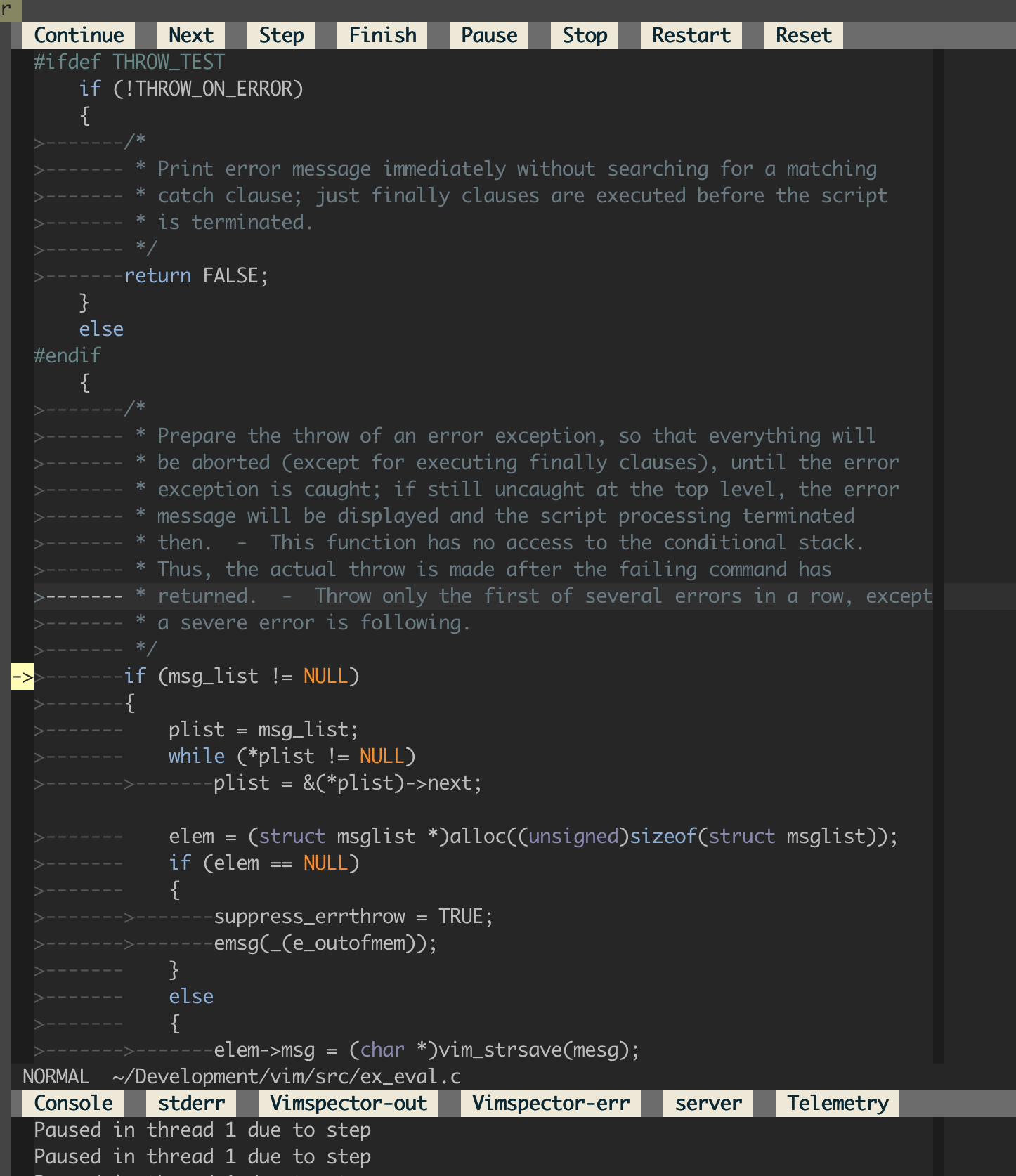
* Step in/out, finish, continue, pause etc. using the WinBar, or mappings.
|
|
* If you really want to, the API is `vimspector#StepInto()` etc.
|
|
|
|
|
|
|
|
## Variables and scopes
|
|
|
|
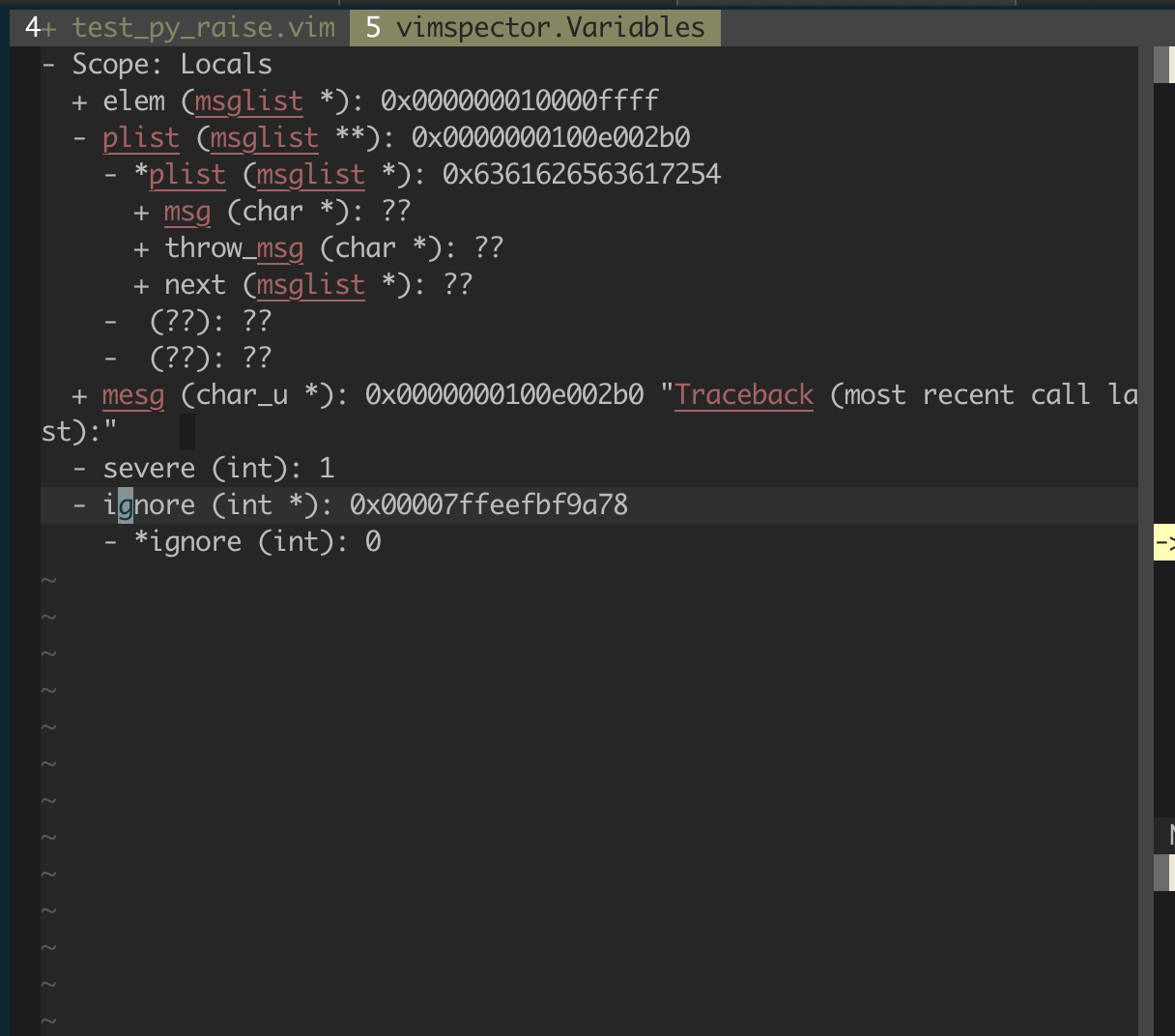
* Current scope shows values of locals.
|
|
* Use `<CR>` to expand/collapse (+, -).
|
|
* When changing the stack frame the locals window updates.
|
|
* While paused, hover to see values
|
|
|
|
|
|
|
|
## Watches
|
|
|
|
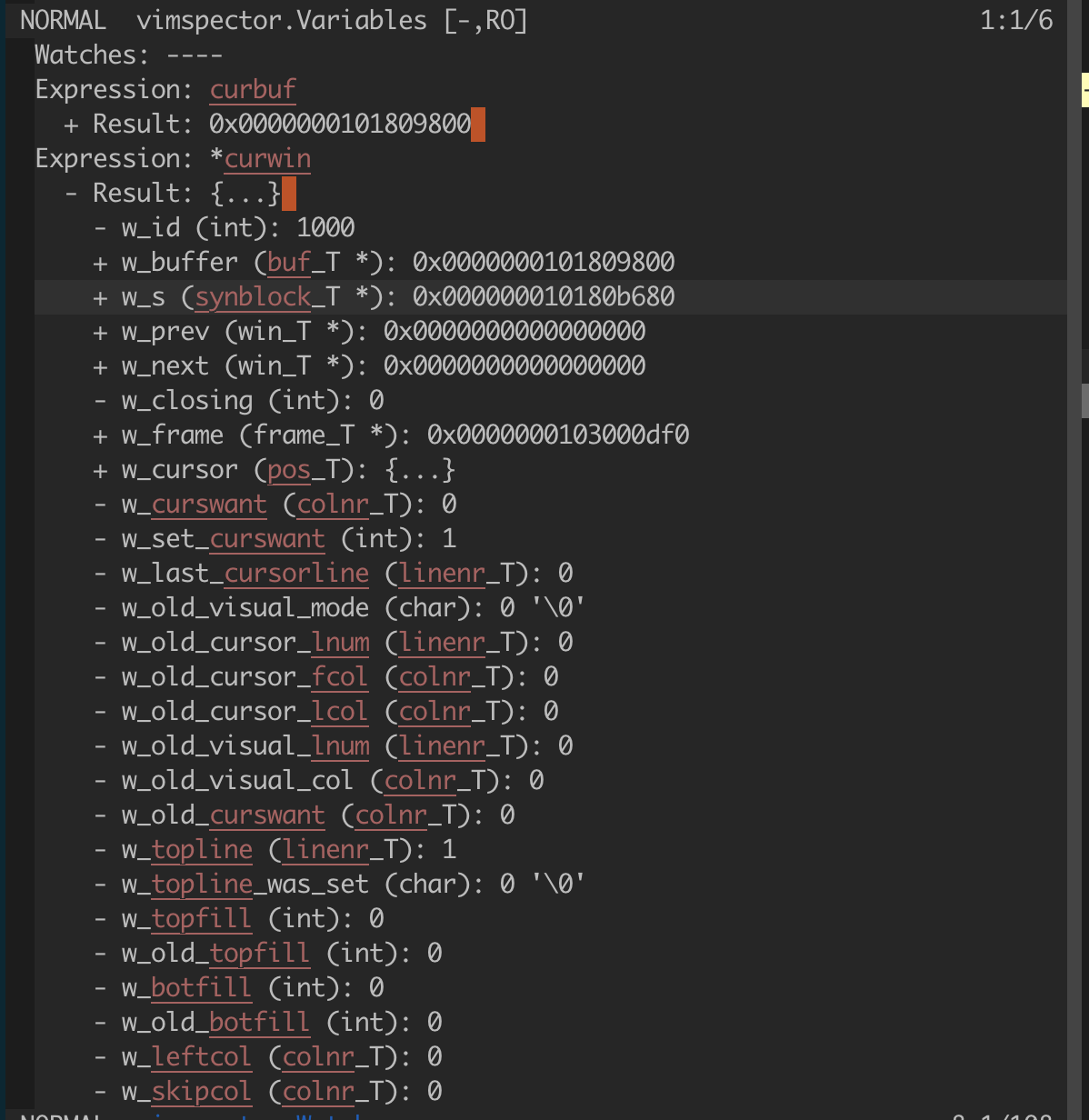
The watches window is a prompt buffer, where that's available. Enter insert mode
|
|
to add a new watch expression.
|
|
|
|
* Add watches to the variables window by entering insert mode and
|
|
typing the expression. Commit with `<CR>`.
|
|
* Alternatively, use `:VimspectorWatch <expression>`. Tab-completion for
|
|
expression is available in some debug adapters.
|
|
* Expand result with `<CR>`.
|
|
* Delete with `<DEL>`.
|
|
|
|
|
|
|
|
## Stack Traces
|
|
|
|
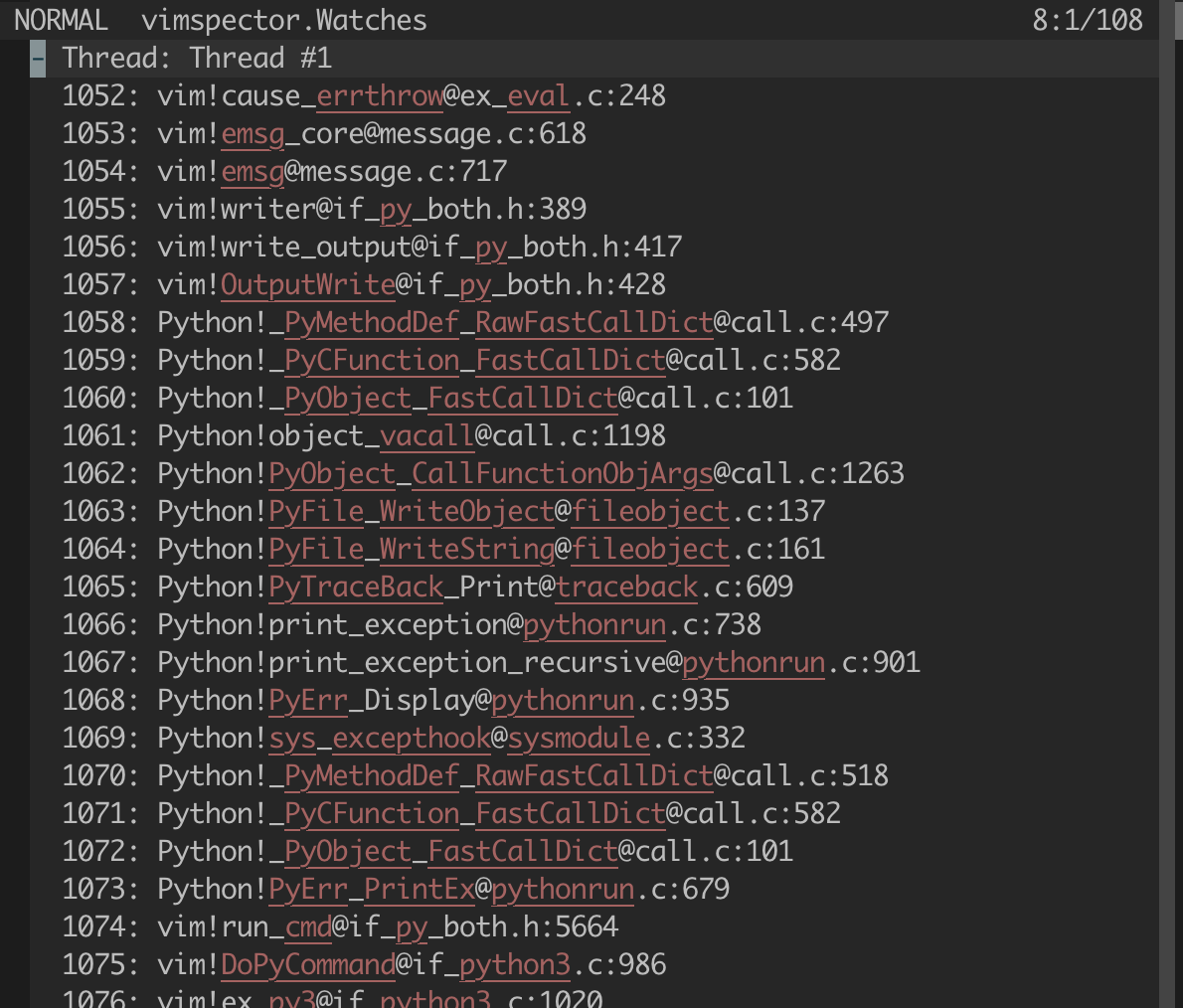
* In the threads window, use `<CR>` to expand/collapse.
|
|
* Use `<CR>` on a stack frame to jump to it.
|
|
|
|
|
|
|
|
## Program Output
|
|
|
|
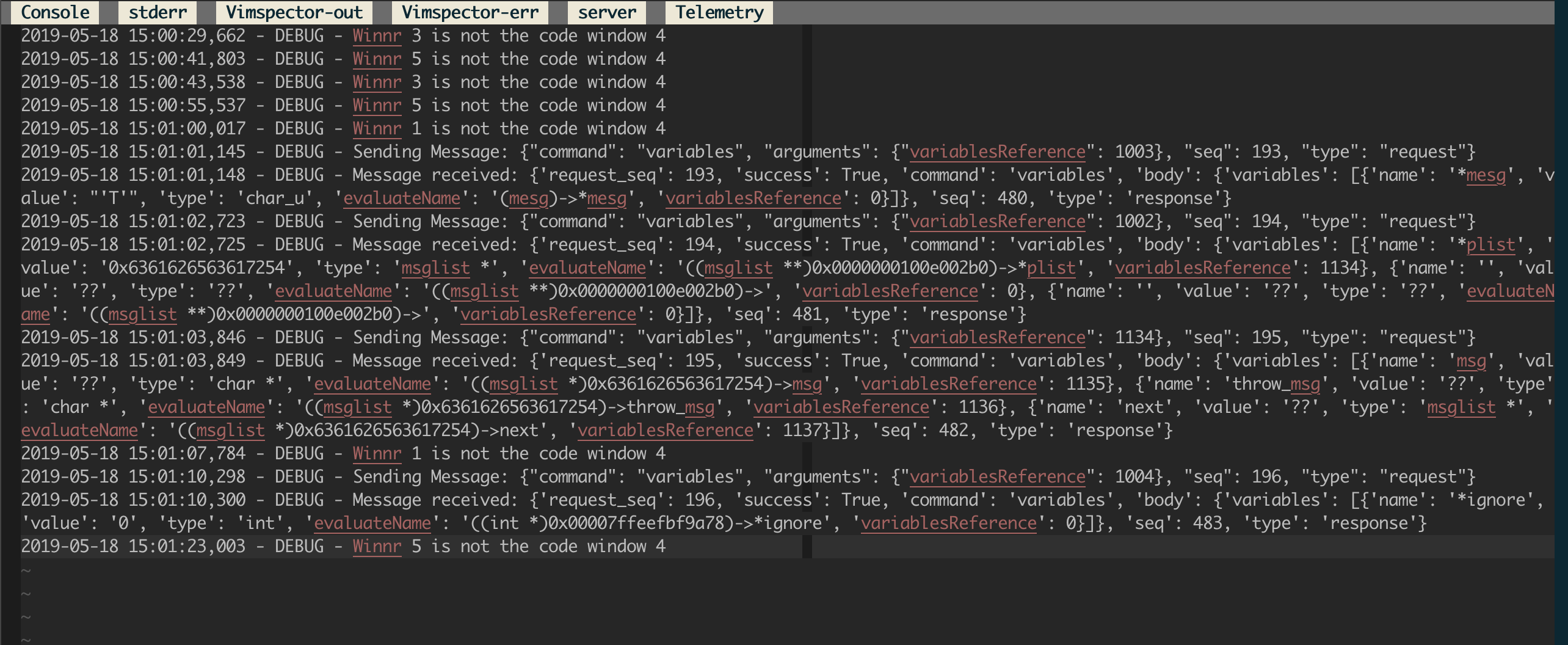
* In the outputs window use the WinBar to select the output channel.
|
|
* Alternatively, use `:VimspectorShowOutput <category>`. Use command-line
|
|
completion to see the categories.
|
|
* The debugee prints to the stdout channel.
|
|
* Other channels may be useful for debugging.
|
|
|
|
|
|
|
|
### Console
|
|
|
|
The console window is a prompt buffer, where that's available, and can be used
|
|
as an interactive CLI for the debug adapter. Support for this varies amongt
|
|
adapters.
|
|
|
|
* Enter insert mode to enter a command to evaluate.
|
|
* Alternatively, `:VimspectorEval <expression>`. Completion is available with
|
|
some debug adapters.
|
|
* Commit the request with `<CR>`
|
|
* The request and subsequent result are printed.
|
|
|
|
NOTE: See also [Watches](#watches) above.
|
|
|
|
## Closing debugger
|
|
|
|
To close the debugger, use:
|
|
|
|
* `Reset` WinBar button (`set mouse=a`)
|
|
* `:VimspectorReset` when the WinBar is not available.
|
|
* `call vimspector#Reset()`
|
|
|
|
# Debug adapter configuration
|
|
|
|
For an introduction to the configuration of `.vimspector.json`, take a look at
|
|
the Getting Started section of the [Vimspector website][website].
|
|
|
|
For full explanation, including how to use variables, substitutions and how to
|
|
specify exception breakpoints, see [the docs][vimspector-ref].
|
|
|
|
The JSON configuration file allows C-style comments:
|
|
|
|
* `// comment to end of line ...`
|
|
* `/* inline comment ... */`
|
|
|
|
Current tested with the following debug adapters.
|
|
|
|
## C, C++, Rust, etc.
|
|
|
|
* C++: [vscode-cpptools](https://github.com/Microsoft/vscode-cpptools)
|
|
|
|
|
|
Example `.vimspector.json` (works with both `vscode-cpptools` and `lldb-vscode`.
|
|
For `lldb-vscode` replace the name of the adapter with `lldb-vscode`:
|
|
|
|
* vscode-cpptools Linux/MacOS:
|
|
|
|
```
|
|
{
|
|
"configurations": {
|
|
"Launch": {
|
|
"adapter": "vscode-cpptools",
|
|
"configuration": {
|
|
"request": "launch",
|
|
"program": "<path to binary>",
|
|
"args": [ ... ],
|
|
"cwd": "<working directory>",
|
|
"environment": [ ... ],
|
|
"externalConsole": true,
|
|
"MIMode": "<lldb or gdb>"
|
|
}
|
|
},
|
|
"Attach": {
|
|
"adapter": "vscode-cpptools",
|
|
"configuration": {
|
|
"request": "attach",
|
|
"program": "<path to binary>",
|
|
"MIMode": "<lldb or gdb>"
|
|
}
|
|
}
|
|
...
|
|
}
|
|
}
|
|
```
|
|
|
|
* vscode-cpptools Windows
|
|
|
|
***NOTE FOR WINDOWS USERS:*** You need to install `gdb.exe`. I recommend using
|
|
`scoop install gdb`. Vimspector cannot use the visual studio debugger due to
|
|
licensing.
|
|
|
|
```
|
|
{
|
|
"configurations": {
|
|
"Launch": {
|
|
"adapter": "vscode-cpptools",
|
|
"configuration": {
|
|
"request": "launch",
|
|
"program": "<path to binary>",
|
|
"stopAtEntry": true
|
|
}
|
|
}
|
|
}
|
|
}
|
|
```
|
|
|
|
* lldb-vscode (MacOS)
|
|
|
|
An alternative is to to use `lldb-vscode`, which comes with llvm. Here's how:
|
|
|
|
* Install llvm (e.g. with HomeBrew: `brew install llvm`)
|
|
* Create a file named
|
|
`/path/to/vimspector/gadgets/macos/.gadgets.d/lldb-vscode.json`:
|
|
|
|
```json
|
|
{
|
|
"adapters": {
|
|
"lldb-vscode": {
|
|
"variables": {
|
|
"LLVM": {
|
|
"shell": "brew --prefix llvm"
|
|
}
|
|
},
|
|
"attach": {
|
|
"pidProperty": "pid",
|
|
"pidSelect": "ask"
|
|
},
|
|
"command": [
|
|
"${LLVM}/bin/lldb-vscode"
|
|
],
|
|
"env": {
|
|
"LLDB_LAUNCH_FLAG_LAUNCH_IN_TTY": "YES"
|
|
},
|
|
"name": "lldb"
|
|
}
|
|
}
|
|
}
|
|
```
|
|
|
|
### Remote debugging
|
|
|
|
The cpptools documentation describes how to attach cpptools to gdbserver using
|
|
`miDebuggerAddress`. Note that when doing this you should use the
|
|
`"request": "attach"`.
|
|
|
|
### Remote launch and attach
|
|
|
|
If you're feeling fancy, checkout the [reference guide][remote-debugging] for
|
|
an example of getting Vimspector to remotely launch and attach.
|
|
|
|
## Python
|
|
|
|
* Python: [debugpy][]
|
|
* Requires `install_gadget.py --enable-python`, ideally requires a working
|
|
compiler and the python development headers/libs to build a C python extension
|
|
for performance.
|
|
* Full options: https://github.com/microsoft/debugpy/wiki/Debug-configuration-settings
|
|
|
|
|
|
**Migrating from `vscode-python`**: change `"adapter": "vscode-python"` to
|
|
`"adapter": "debugpy"`.
|
|
|
|
```json
|
|
{
|
|
"configurations": {
|
|
"<name>: Launch": {
|
|
"adapter": "debugpy",
|
|
"configuration": {
|
|
"name": "<name>: Launch",
|
|
"type": "python",
|
|
"request": "launch",
|
|
"cwd": "<working directory>",
|
|
"python": "/path/to/python/interpreter/to/use",
|
|
"stopOnEntry": true,
|
|
"console": "externalTerminal",
|
|
"debugOptions": [],
|
|
"program": "<path to main python file>"
|
|
}
|
|
}
|
|
...
|
|
}
|
|
}
|
|
```
|
|
|
|
### Remote Debugging
|
|
|
|
In order to use remote debugging with debugpy, you have to connect Vimspector
|
|
directly to the application that is being debugged. This is easy, but it's a
|
|
little different from how we normally configure things. Specifically, you need
|
|
to:
|
|
|
|
|
|
* Start your application with debugpy, specifying the `--listen` argument. See
|
|
[the debugpy
|
|
documentation](https://github.com/microsoft/debugpy#debugpy-cli-usage) for
|
|
details.
|
|
* use the built-in "multi-session" adapter. This just asks for the host/port to
|
|
connect to. For example:
|
|
|
|
```json
|
|
{
|
|
"configurations": {
|
|
"Python Attach": {
|
|
"adapter": "multi-session",
|
|
"configuration": {
|
|
"request": "attach",
|
|
"pathMappings": [
|
|
// mappings here (optional)
|
|
]
|
|
}
|
|
}
|
|
}
|
|
}
|
|
```
|
|
|
|
See [deatils of the launch
|
|
configuration](https://github.com/microsoft/debugpy/wiki/Debug-configuration-settings)
|
|
for explanation of things like `pathMappings`.
|
|
|
|
Additional documenation, including how to do this when the remote machine can
|
|
only be contacted via SSH [are provided by
|
|
debugpy](https://github.com/microsoft/debugpy/wiki/Debugging-over-SSH).
|
|
|
|
### Remote launch and attach
|
|
|
|
If you're feeling fancy, checkout the [reference guide][remote-debugging] for
|
|
an example of getting Vimspector to remotely launch and attach.
|
|
|
|
### Legacy: vscode-python
|
|
|
|
* No longer installed by default - please pass `--force-enable-python.legacy` if
|
|
you just want to continue using your working setup.
|
|
* [vscode-python](https://github.com/Microsoft/vscode-python)
|
|
* NOTE: You must be running `node` 10. See [this issue](https://github.com/puremourning/vimspector/issues/105)
|
|
|
|
```json
|
|
{
|
|
"configurations": {
|
|
"<name>: Launch": {
|
|
"adapter": "vscode-python",
|
|
"configuration": {
|
|
"name": "<name>: Launch",
|
|
"type": "python",
|
|
"request": "launch",
|
|
"cwd": "<working directory>",
|
|
"stopOnEntry": true,
|
|
"console": "externalTerminal",
|
|
"debugOptions": [],
|
|
"program": "<path to main python file>"
|
|
}
|
|
}
|
|
...
|
|
}
|
|
}
|
|
```
|
|
|
|
## TCL
|
|
|
|
* TCL (TclProDebug)
|
|
|
|
See [my fork of TclProDebug](https://github.com/puremourning/TclProDebug) for instructions.
|
|
|
|
## C♯
|
|
|
|
* C# - dotnet core
|
|
|
|
Requires `install_gadget.py --force-enable-csharp`
|
|
|
|
```json
|
|
{
|
|
"configurations": {
|
|
"launch - netcoredbg": {
|
|
"adapter": "netcoredbg",
|
|
"configuration": {
|
|
"request": "launch",
|
|
"program": "${workspaceRoot}/bin/Debug/netcoreapp2.2/csharp.dll",
|
|
"args": [],
|
|
"stopAtEntry": true
|
|
}
|
|
}
|
|
}
|
|
}
|
|
```
|
|
|
|
* C# - mono
|
|
|
|
Requires `install_gadget.py --force-enable-csharp`.
|
|
|
|
***Known not to work.***
|
|
|
|
```json
|
|
{
|
|
"configurations": {
|
|
"launch - mono": {
|
|
"adapter": "vscode-mono-debug",
|
|
"configuration": {
|
|
"request": "launch",
|
|
"program": "${workspaceRoot}/bin/Debug/netcoreapp2.2/csharp.dll",
|
|
"args": [],
|
|
"cwd": "${workspaceRoot}",
|
|
"runtimeExecutable": "mono",
|
|
"runtimeArgs": [],
|
|
"env": [],
|
|
"externalConsole": false,
|
|
"console": "integratedTerminal"
|
|
}
|
|
}
|
|
}
|
|
}
|
|
```
|
|
|
|
## Go
|
|
|
|
* Go
|
|
|
|
Requires:
|
|
|
|
* `install_gadget.py --enable-go`
|
|
* [Delve][delve-install] installed, e.g. `go get -u github.com/go-delve/delve/cmd/dlv`
|
|
* Delve to be in your PATH, or specify the `dlvToolPath` launch option
|
|
|
|
```json
|
|
{
|
|
"configurations": {
|
|
"run": {
|
|
"adapter": "vscode-go",
|
|
"configuration": {
|
|
"request": "launch",
|
|
"program": "${fileDirname}",
|
|
"mode": "debug",
|
|
"dlvToolPath": "$HOME/go/bin/dlv"
|
|
}
|
|
}
|
|
}
|
|
}
|
|
```
|
|
|
|
## PHP
|
|
|
|
This uses the php-debug, see
|
|
https://marketplace.visualstudio.com/items?itemName=felixfbecker.php-debug
|
|
|
|
Requires:
|
|
|
|
* (optional) Xdebug helper for chrome https://chrome.google.com/webstore/detail/xdebug-helper/eadndfjplgieldjbigjakmdgkmoaaaoc
|
|
* `install_gadget.py --force-enable-php`
|
|
* configured php xdebug extension
|
|
```ini
|
|
zend_extension=xdebug.so
|
|
xdebug.remote_enable=on
|
|
xdebug.remote_handler=dbgp
|
|
xdebug.remote_host=localhost
|
|
xdebug.remote_port=9000
|
|
```
|
|
replace `localhost` with the ip of your workstation.
|
|
|
|
lazy alternative
|
|
```ini
|
|
zend_extension=xdebug.so
|
|
xdebug.remote_enable=on
|
|
xdebug.remote_handler=dbgp
|
|
xdebug.remote_connect_back=true
|
|
xdebug.remote_port=9000
|
|
```
|
|
|
|
* .vimspectory.json
|
|
```json
|
|
{
|
|
"configurations": {
|
|
"Listen for XDebug": {
|
|
"adapter": "vscode-php-debug",
|
|
"configuration": {
|
|
"name": "Listen for XDebug",
|
|
"type": "php",
|
|
"request": "launch",
|
|
"port": 9000,
|
|
"stopOnEntry": false,
|
|
"pathMappings": {
|
|
"/var/www/html": "${workspaceRoot}"
|
|
}
|
|
}
|
|
},
|
|
"Launch currently open script": {
|
|
"adapter": "vscode-php-debug",
|
|
"configuration": {
|
|
"name": "Launch currently open script",
|
|
"type": "php",
|
|
"request": "launch",
|
|
"program": "${file}",
|
|
"cwd": "${fileDirname}",
|
|
"port": 9000
|
|
}
|
|
}
|
|
}
|
|
}
|
|
```
|
|
|
|
### Debug web application
|
|
append `XDEBUG_SESSION_START=xdebug` to your query string
|
|
```
|
|
curl "http://localhost?XDEBUG_SESSION_START=xdebug"
|
|
```
|
|
or use the previously mentioned Xdebug Helper extension (which sets a `XDEBUG_SESSION` cookie)
|
|
|
|
### Debug cli application
|
|
```
|
|
export XDEBUG_CONFIG="idekey=xdebug"
|
|
php <path to script>
|
|
```
|
|
|
|
## JavaScript, TypeScript, etc.
|
|
|
|
* Node.js
|
|
|
|
Requires:
|
|
|
|
* `install_gadget.py --force-enable-node`
|
|
* For installation, a Node.js environemt that is < node 12. I believe this is an
|
|
incompatibility with gulp. Advice, use [nvm][] with `nvm install --lts 10; nvm
|
|
use --lts 10; ./install_gadget.py --force-enable-node ...`
|
|
* Options described here:
|
|
https://code.visualstudio.com/docs/nodejs/nodejs-debugging
|
|
* Example: `support/test/node/simple`
|
|
|
|
```json
|
|
{
|
|
"configurations": {
|
|
"run": {
|
|
"adapter": "vscode-node",
|
|
"configuration": {
|
|
"request": "launch",
|
|
"protocol": "auto",
|
|
"stopOnEntry": true,
|
|
"console": "integratedTerminal",
|
|
"program": "${workspaceRoot}/simple.js",
|
|
"cwd": "${workspaceRoot}"
|
|
}
|
|
}
|
|
}
|
|
}
|
|
```
|
|
|
|
* Chrome
|
|
|
|
This uses the chrome debugger, see
|
|
https://marketplace.visualstudio.com/items?itemName=msjsdiag.debugger-for-chrome.
|
|
|
|
It allows you to debug scripts running inside chrome from within Vim.
|
|
|
|
* `./install_gadget.py --force-enable-chrome`
|
|
* Example: `support/test/chrome`
|
|
|
|
```json
|
|
{
|
|
"configurations": {
|
|
"launch": {
|
|
"adapter": "chrome",
|
|
"configuration": {
|
|
"request": "launch",
|
|
"url": "http://localhost:1234/",
|
|
"webRoot": "${workspaceRoot}/www"
|
|
}
|
|
}
|
|
}
|
|
}
|
|
```
|
|
|
|
## Java
|
|
|
|
Vimsepctor works well with the [java debug server][java-debug-server], which
|
|
runs as a jdt.ls (Java Language Server) plugin, rather than a standalone
|
|
debug adapter.
|
|
|
|
Vimspector is not in the business of running language servers, only debug
|
|
adapters, so this means that you need a compatible Language Server Protocol
|
|
editor plugin to use Java. I recommend [YouCompleteMe][], which has full support
|
|
for jdt.ls, and most importantly a trivial way to load the debug adapter and to
|
|
use it with Vimspector.
|
|
|
|
### Usage with YouCompleteMe
|
|
|
|
* Set up [YCM for java][YcmJava].
|
|
* Get Vimspector to download the java debug plugin:
|
|
`install_gadget.py --force-enable-java <other options...>`
|
|
* Configure Vimspector for your project using the `vscode-java` adapter, e.g.:
|
|
|
|
```json
|
|
{
|
|
"configurations": {
|
|
"Java Attach": {
|
|
"adapter": "vscode-java",
|
|
"configuration": {
|
|
"request": "attach",
|
|
"hostName": "${host}",
|
|
"port": "${port}",
|
|
"sourcePaths": [
|
|
"${workspaceRoot}/src/main/java",
|
|
"${workspaceRoot}/src/test/java"
|
|
]
|
|
}
|
|
}
|
|
}
|
|
}
|
|
```
|
|
|
|
* Tell YCM to load the debugger plugin and create a mapping, such as
|
|
`<leader><F5>` to start the debug server and launch vimspector, e.g. in
|
|
`~/.vim/ftplugin/java.vim`:
|
|
|
|
```viml
|
|
" Tell YCM where to find the plugin. Add to any existing values.
|
|
let g:ycm_java_jdtls_extension_path = [
|
|
\ '</path/to/Vimspector/gadgets/<os>'
|
|
\ ]
|
|
|
|
let s:jdt_ls_debugger_port = 0
|
|
function! s:StartDebugging()
|
|
if s:jdt_ls_debugger_port <= 0
|
|
" Get the DAP port
|
|
let s:jdt_ls_debugger_port = youcompleteme#GetCommandResponse(
|
|
\ 'ExecuteCommand',
|
|
\ 'vscode.java.startDebugSession' )
|
|
|
|
if s:jdt_ls_debugger_port == ''
|
|
echom "Unable to get DAP port - is JDT.LS initialized?"
|
|
let s:jdt_ls_debugger_port = 0
|
|
return
|
|
endif
|
|
endif
|
|
|
|
" Start debugging with the DAP port
|
|
call vimspector#LaunchWithSettings( { 'DAPPort': s:jdt_ls_debugger_port } )
|
|
endfunction
|
|
|
|
nnoremap <silent> <buffer> <Leader><F5> :call <SID>StartDebugging()<CR>
|
|
|
|
```
|
|
|
|
You can then use `<Leader><F5>` to start debugging rather than just `<F5>`.
|
|
|
|
For the launch arguments, see the
|
|
[vscode document](https://code.visualstudio.com/docs/java/java-debugging).
|
|
|
|
### Other LSP clients
|
|
|
|
See [this issue](https://github.com/puremourning/vimspector/issues/3) for more
|
|
background.
|
|
|
|
## Rust
|
|
|
|
Rust is supported with any gdb/lldb-based debugger. So it works fine with
|
|
`vscode-cpptools` and `lldb-vscode` above. However, support for rust is best in
|
|
[`CodeLLDB`](https://github.com/vadimcn/vscode-lldb#features).
|
|
|
|
* `./install_gadget.py --force-enable-rust`
|
|
* Example: `support/test/rust/vimspector_test`
|
|
|
|
```json
|
|
{
|
|
"configurations": {
|
|
"launch": {
|
|
"adapter": "CodeLLDB",
|
|
"configuration": {
|
|
"request": "launch",
|
|
"program": "${workspaceRoot}/target/debug/vimspector_test"
|
|
}
|
|
}
|
|
}
|
|
}
|
|
```
|
|
|
|
* Docs: https://github.com/vadimcn/vscode-lldb/blob/master/MANUAL.md
|
|
|
|
|
|
## Other servers
|
|
|
|
* Java - vscode-javac. This works, but is not as functional as Java Debug
|
|
Server. Take a look at [this
|
|
comment](https://github.com/puremourning/vimspector/issues/3#issuecomment-576916076)
|
|
for instructions.
|
|
|
|
|
|
# Customisation
|
|
|
|
There is very limited support for customistaion of the UI.
|
|
|
|
## Changing the default signs
|
|
|
|
Vimsector uses the following signs internally. If they are defined before
|
|
Vimsector uses them, they will not be replaced. So to customise the signs,
|
|
define them in your `vimrc`.
|
|
|
|
* `vimspectorBP`: A breakpoint.
|
|
* `vimspectorBPDisabled`: A disabled breakpoint
|
|
* `vimspectorPC` The program counter, i.e. current line.
|
|
|
|
For example, to use some unicode symbols, you could put this in your `vimrc`:
|
|
|
|
```viml
|
|
sign define vimspectorBP text=🔴 texthl=Normal
|
|
sign define vimspectorBPDisabled text=🔵 texthl=Normal
|
|
sign define vimspectorPC text=🔶 texthl=SpellBad
|
|
```
|
|
|
|
# FAQ
|
|
|
|
1. Q: Does it work? A: Yeah. It's a bit unpolished.
|
|
2. Q: Does it work with _this_ language? A: Probably, but it won't
|
|
necessarily be easy to work out what to put in the `.vimspector.json`. As you
|
|
can see above, some of the servers aren't really editor agnostic, and require
|
|
very-specific unique handling.
|
|
3. How do I stop it starting a new Terminal.app on macOS? See [this
|
|
comment](https://github.com/puremourning/vimspector/issues/90#issuecomment-577857322)
|
|
4. Can I specify answers to the annoying questions about exception breakpoints
|
|
in my `.vimspector.json` ? Yes, see [here][vimspector-ref-exception].
|
|
5. Do I have to specify the file to execute in `.vimspector.json`, or could it be the current vim file?
|
|
You don't need to. You can specify $file for the current active file. See [here][vimspector-ref-var] for complete list of replacements in the configuration file.
|
|
6. You allow comments in `.vimspector.json`, but Vim highlights these as errors,
|
|
do you know how to make this not-an-error? Yes, put this in
|
|
`~/.vim/after/syntax/json.vim`:
|
|
|
|
```viml
|
|
syn region jsonComment start="/\*" end="\*/"
|
|
hi link jsonCommentError Comment
|
|
hi link jsonComment Comment
|
|
```
|
|
|
|
# Motivation
|
|
|
|
A message from the author about the motivation for this plugin:
|
|
|
|
> Many development environments have a built-in debugger. I spend an inordinate
|
|
> amount of my time in Vim. I do all my development in Vim and I have even
|
|
> customised my workflows for building code, running tests etc.
|
|
>
|
|
> For many years I have observed myself, friends and colleagues have been
|
|
> writing `printf`, `puts`, `print`, etc. debugging statements in all sorts of
|
|
> files simply because there is no _easy_ way to run a debugger for _whatever_
|
|
> language we happen to be developing in.
|
|
>
|
|
> I truly believe that interactive, graphical debugging environments are the
|
|
> best way to understand and reason about both unfamiliar and familiar code, and
|
|
> that the lack of ready, simple access to a debugger is a huge hidden
|
|
> productivity hole for many.
|
|
>
|
|
> Don't get me wrong, I know there are literally millions of developers out
|
|
> there that are more than competent at developing without a graphical debugger,
|
|
> but I maintain that if they had the ability to _just press a key_ and jump
|
|
> into the debugger, it would be faster and more enjoyable that just cerebral
|
|
> code comprehension.
|
|
>
|
|
> I created Vimsepctor because I find changing tools frustrating. `gdb` for c++,
|
|
> `pdb` for python, etc. Each has its own syntax. Each its own lexicon. Each its
|
|
> own foibles.
|
|
>
|
|
> I designed the configuration system in such a way that the configuration can
|
|
> be committed to source control so that it _just works_ for any of your
|
|
> colleagues, friends, collaborators or complete strangers.
|
|
>
|
|
> I made remote debugging a first-class feature because that's a primary use
|
|
> case for me in my job.
|
|
>
|
|
> With Vimspector I can _just hit `<F5>`_ in all of the languages I develop in
|
|
> and debug locally or remotely using the exact same workflow, mappings and UI.
|
|
> I have integrated this with my Vim in such a way that I can hit a button and
|
|
> _run the test under the cursor in Vimspector_. This kind of integration has
|
|
> massively improved my workflow and productivity. It's even made the process
|
|
> of learning a new codebase... fun.
|
|
>
|
|
> \- Ben Jackson, Creator.
|
|
|
|
# License
|
|
|
|
[Apache 2.0](http://www.apache.org/licenses/LICENSE-2.0)
|
|
|
|
Copyright © 2018 Ben Jackson
|
|
|
|
[ycmd]: https://github.com/Valloric/ycmd
|
|
[gitter]: https://gitter.im/vimspector/Lobby?utm_source=share-link&utm_medium=link&utm_campaign=share-link
|
|
[java-debug-server]: https://github.com/Microsoft/java-debug
|
|
[website]: https://puremourning.github.io/vimspector-web/
|
|
[delve]: https://github.com/go-delve/delve
|
|
[delve-install]: https://github.com/go-delve/delve/tree/master/Documentation/installation
|
|
[vimspector-ref]: https://puremourning.github.io/vimspector/configuration.html
|
|
[vimspector-ref-var]: https://puremourning.github.io/vimspector/configuration.html#replacements-and-variables
|
|
[vimspector-ref-exception]: https://puremourning.github.io/vimspector/configuration.html#exception-breakpoints
|
|
[debugpy]: https://github.com/microsoft/debugpy
|
|
[YouCompleteMe]: https://github.com/ycm-core/YouCompleteMe#java-semantic-completion
|
|
[remote-debugging]: https://puremourning.github.io/vimspector/configuration.html#remote-debugging-support
|